Create a daily brief with Claude scheduled tasks and ContextStore


Every morning at 4 AM, Claude does my research for me.
No prompts. No topic list. No "can you look into X for me." It wakes up on its own, figures out what I'm working on, and has a briefing waiting when I sit down. For the past few weeks I've been running an experiment: every morning, Claude scans all of my ContextStore spaces, figures out what I'm working on across projects, picks 5-10 topics on its own, does a round of research, and creates a Daily Brief in ContextStore. I don't have to tell it what to research. It already knows.
The key ingredients are Claude's scheduled tasks and ContextStore. Together they become an autonomous research assistant.
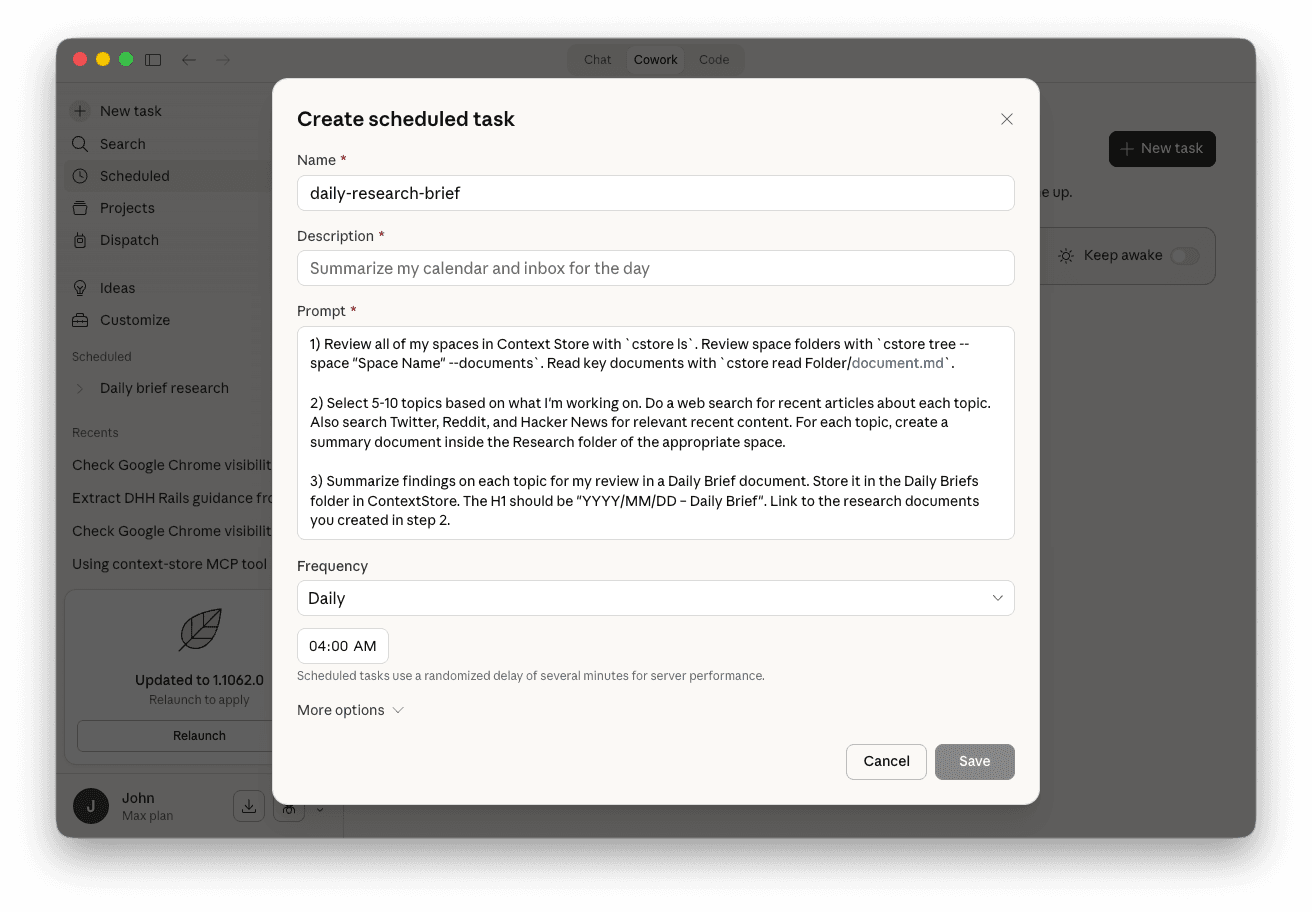
Here's how to set it up:
-
In Claude Cowork, click on Scheduled tasks in the sidebar
-
Click, New task and use a variation on the following prompt:
1) Review all of my spaces in ContextStore with `cstore ls`. Review space folders with `cstore tree --space "Space Name" --documents`. Read key documents with `cstore read Folder/document.md`.

2) Select 5-10 topics based on what I'm working on. Do a web search for recent articles about each topic. Also search Twitter, Reddit, and Hacker News for relevant recent content. For each topic, create a summary document inside the Research folder of the appropriate space.

3) Summarize findings on each topic for my review in a Daily Brief document. Store it in the Daily Briefs folder in ContextStore. The H1 should be "YYYY/MM/DD – Daily Brief". Link to the research documents you created in step 2.
1) Review all of my spaces in ContextStore with `cstore ls`. Review space folders with `cstore tree --space "Space Name" --documents`. Read key documents with `cstore read Folder/document.md`. 2) Select 5-10 topics based on what I'm working on. Do a web search for recent articles about each topic. Also search Twitter, Reddit, and Hacker News for relevant recent content. For each topic, create a summary document inside the Research folder of the appropriate space. 3) Summarize findings on each topic for my review in a Daily Brief document. Store it in the Daily Briefs folder in ContextStore. The H1 should be "YYYY/MM/DD – Daily Brief". Link to the research documents you created in step 2. -
Set it to run on a Daily or Weekly cadence. I have mine set to run in the early hours of the morning.
Three simple steps: orient, research, and summarize. The agent will read the landscape of what I'm working on, do the legwork to research topics across the web and a few social sources, and hand me a structured brief with links to deeper notes for reference.
What's particularly useful about this workflow is that ContextStore automatically syncs everything through GitHub. This means even though the task is running locally on my Macbook, everyone on my team who is using ContextStore benefits.
Comments
You might also like…
Give your AI the full picture with a context repository
John LongAIPoor AI output usually isn't a prompting problem, it's a context problem. A context repository gives your AI the business knowledge it needs to make good decisions. Here's how to build one.

How I manage my dev workflow with three Agent skills
John LongAIOne of the most exciting things about LLMs is their ability to do useful things that would be hard to script in the traditional sense. Skills take this further, letting you build intelligent workflows that handle the messy, context-dependent parts of product development.
Introducing ContextStore: a native Mac app for context repositories
John LongContextStorePoor AI output is usually a context problem, not a prompting problem. ContextStore is a native Mac app that makes it easy for anyone on your team to build and manage a Markdown-based context repository.
If software becomes ephemeral
John LongAIWhen software can be conjured from a conversation, the real differentiator won't be the code — it'll be the taste, the brand, and the vision behind it.